Preferences#
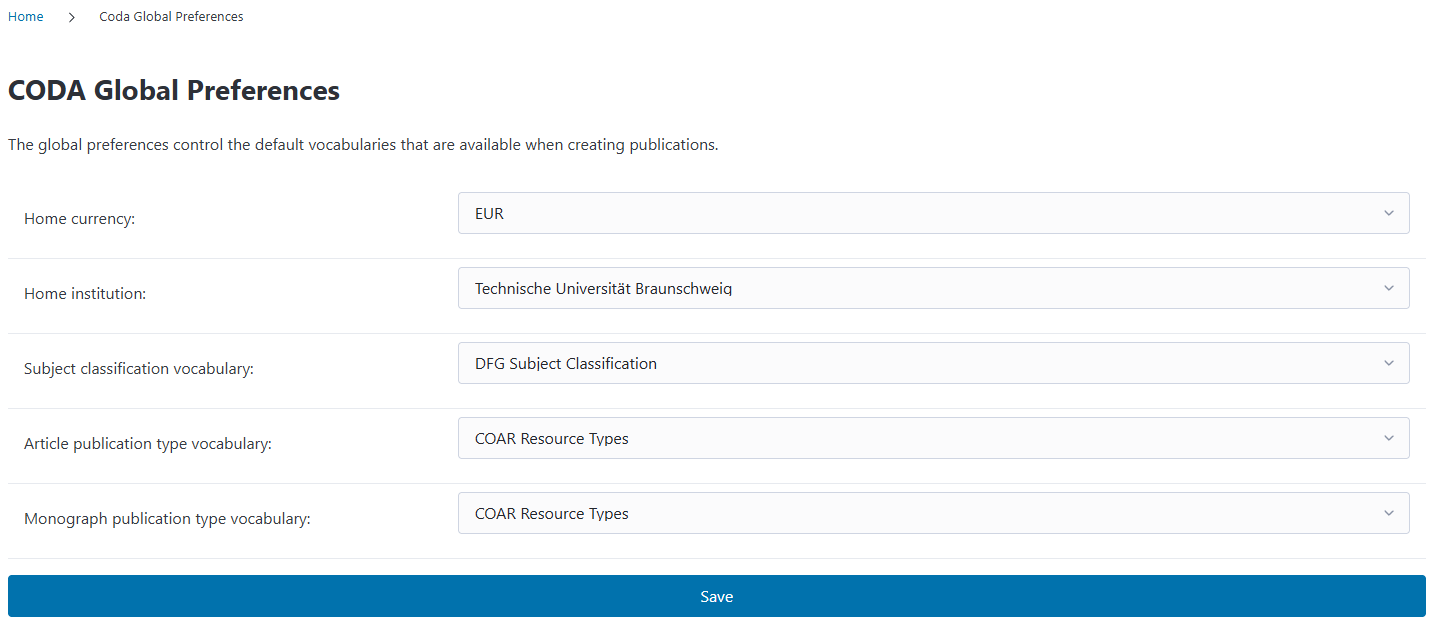
The Preferences page allows you to configure global settings that affect how CODA works across your entire installation. These settings control default vocabularies for publications, your institution’s home currency, and your home institution information.
Home Institution#
The Home Institution setting specifies your primary institution. This is used throughout CODA, particularly when generating openCost reports.
How to Set Your Home Institution#
Click on the Home Institution dropdown
Select your institution from the list
Click Save at the bottom of the page
Why Is This Important?#
When you generate openCost export reports, CODA needs to know which institution the data belongs to. The home institution setting appears in openCost XML exports with institutional identifiers (ROR, ISNI, Ringgold)
Setup Tip
Before setting your home institution, make sure you’ve created it in Organization Structure and added its institutional identifiers (especially ROR ID). This ensures your exported data includes proper institutional identification.
What If I Don’t Set a Home Institution?#
If you generate an openCost report without setting a home institution, CODA will show validation warnings. The report will still be generated, but it will be missing institutional information, which may be required by funding organizations or transparency initiatives (openCost requires this mandatorily).
Home Currency#
The Home Currency setting defines the default currency used throughout CODA. It is especially important for conversions of invoices in a foreign currency to the home currency (see invoices).
Available Currencies#
CODA supports all major world currencies. Common examples include:
EUR - Euro
USD - US Dollar
GBP - British Pound
CHF - Swiss Franc
JPY - Japanese Yen
…and many more
Vocabulary Settings#
CODA uses controlled vocabularies to ensure consistency when categorizing publications. The Preferences page lets you choose which vocabularies should be used by default when creating funding requests.
Subject Classification Vocabulary#
This vocabulary is used to categorize publications by subject area or academic discipline.
Default: DFG Subject Classification
The DFG Subject Classification is the German Research Foundation’s comprehensive taxonomy of academic disciplines. It’s widely recognized in European research institutions.
Other options: You can create custom subject classification vocabularies in the Vocabularies section and select them here.
Article Publication Type Vocabulary#
This vocabulary defines the types of articles that can be created in CODA.
Default: COAR Resource Types
The COAR Resource Types Vocabulary is an international standard for describing publication types. CODA filters this vocabulary to show only article-relevant types when this setting is selected.
Monograph Publication Type Vocabulary#
This vocabulary defines the types of books and monographs that can be created in CODA.
Default: COAR Resource Types
Like the article vocabulary, this uses COAR Resource Types.
Why separate article and monograph vocabularies? Different publication formats (articles vs. books) often have different relevant categories, so CODA allows you to customize the available types for each.
How Preferences Affect Other Features#
The settings you configure here impact several other areas of CODA:
Funding Requests#
When creating a funding request, the publication type and subject area dropdowns will show options from your selected vocabularies.
openCost Exports#
When generating openCost reports:
The home institution and its identifiers are included in the XML output
Publications are categorized using your chosen vocabularies
Invoices#
The home currency serves as the default when recording new invoices, though you can always specify a different currency for individual invoices. In that case the currency conversion refers to your home currency.