openCost Reporting#
CODA provides exporting your publication and contract data in the openCost format (XML). You can access the export features by navigating the menu item of the same name.
Note
CODA also provides exporting funding request data with their associated costs to CSV format. See CSV Export for further explanation.
The openCost export feature allows you to generate standardized XML reports of your institution’s publication costs and publishing contracts. openCost is a community-developed standard for exchanging publication cost data, making it easier to share transparent cost information with funding organizations, libraries, and other institutions.
What is openCost?#
openCost is an XML-based format designed specifically for reporting publication costs in scholarly publishing. It provides a standardized way to represent:
Publication metadata (titles, DOIs, publication types, journals)
Associated costs and invoices
Publishing contracts and transformative agreements
Cost sharing arrangements between institutions
Publisher and funding information
By using openCost, your institution can easily exchange cost data with other organizations, funding bodies, or contribute to transparency initiatives in scholarly publishing.
Overview#
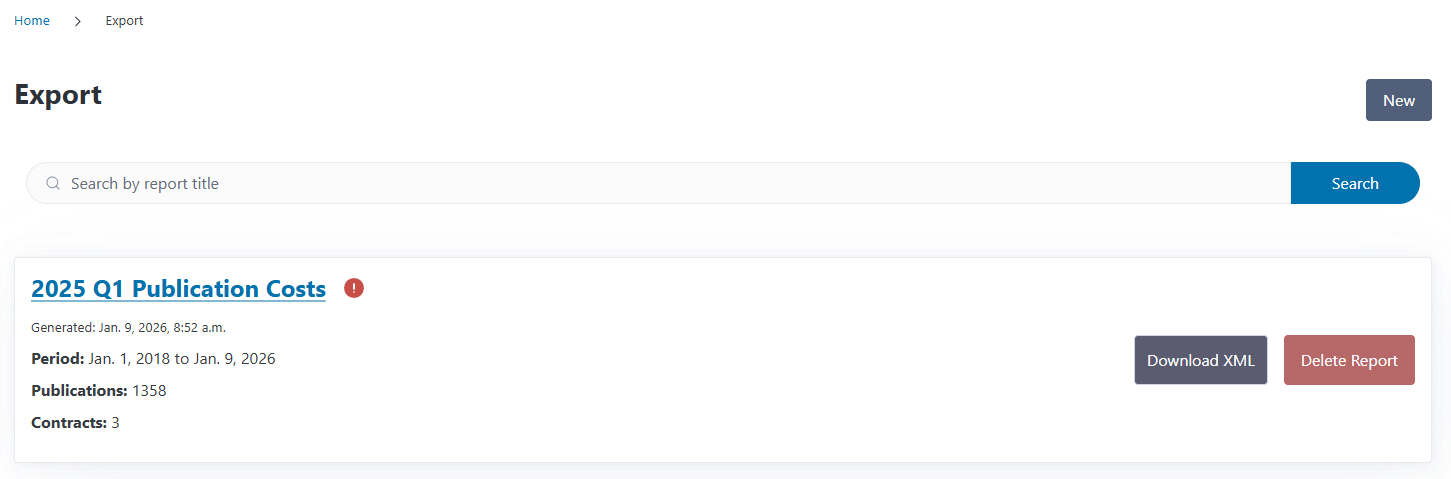
The Export overview page displays all previously generated openCost reports. Each item in the list shows:
Report title and generation date
Reporting period (start and end dates)
Number of publications included
Number of contracts included
Validation status (red exclamation mark; if there are any warnings or issues)
From this page, you can download existing reports as XML files, view detailed information, create new reports, or delete old ones.
Generating a New Report#
To create a new openCost report:
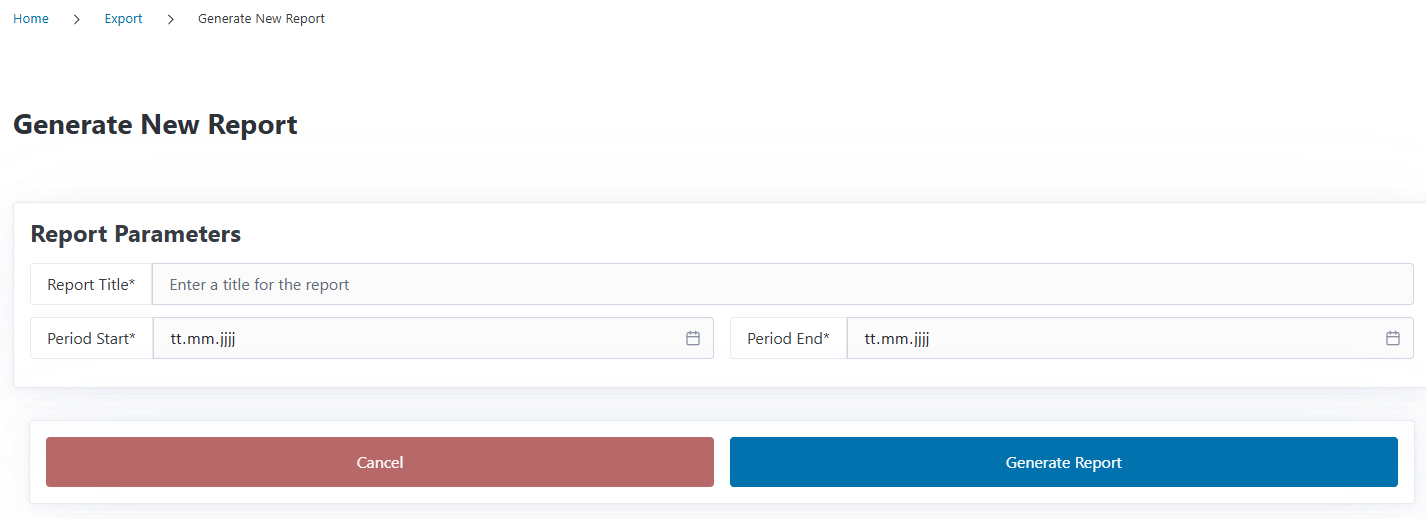
Click the New button on the overview page for openCost reports
Enter a descriptive title for your report (e.g., “2025 Q1 Publication Costs”)
Select the reporting period by choosing start and end dates (refers to paid invoice dates)
Apply filters if needed (see below)
Click Generate Report
CODA will automatically gather all publications and contracts from your institution that fall within the specified date range and create an openCost XML report. Included are publications and contracts that are listed on paid invoices within the period of time you specified.
Filtering Options#
You can use filters to control which publications are included in the openCost report. The following filters are available:
Review Result: Filter by review status (Open, Approved, Rejected, Costs Waived, Closed)
Labels: Include or exclude specific labels
Payment Method: Direct, Reimbursement, or Unknown
Open Access Type: Gold, Diamond, Hybrid, etc.
Publication State: Published, Submitted, Accepted, Rejected, Unknown
Publication Type: Article or Monograph
Funding Source: Filter by specific funding source
Understanding Validation Messages#
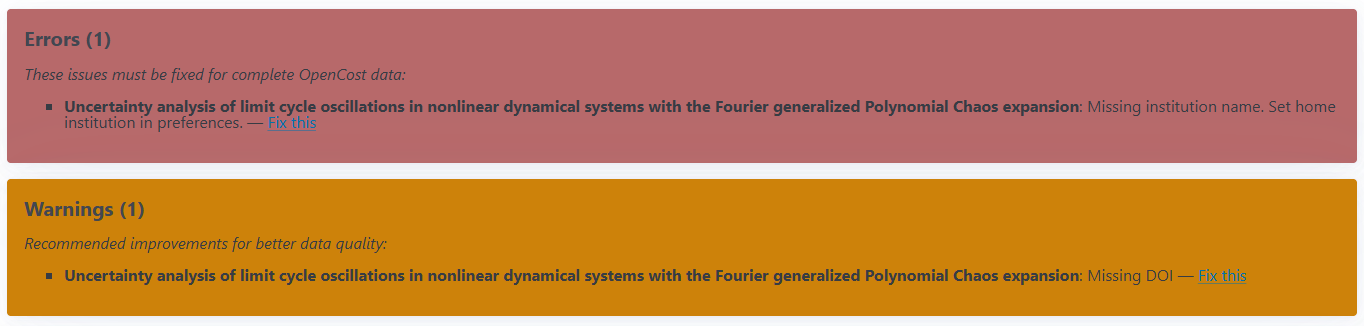
After generating a report, CODA will validate the data against the openCost schema requirements. You may see:
Success message: Your report was generated without any issues
Warning message: The report was created but contains some validation warnings (e.g., missing optional fields that would improve the data quality)
Error message: The report is missing information that is needed to generate a valid openCost report
Validation errors and warnings don’t prevent you from downloading and using the report, but they indicate fields that could be completed to provide more comprehensive data. You can view detailed validation information on the report detail page, where links are provided to fix the issues.
Note
After fixing any issue with the data in the report, use the Regenerate button on the report’s detail page to have the changes included.
Regenerating a Report#
The Regenerate button on a report’s detail page rebuilds that report from your current CODA data: it re-reads the publications, contracts and invoices that match the report, recomputes its XML file and its validation issues, and then takes you back to the detail page with an up-to-date count of errors and warnings.
This keeps the report’s identity — its title, ID and reporting period stay the same — so fixing incomplete data and regenerating is preferable to creating a duplicate report. The download filename reflects the new generation date.
Report Details#
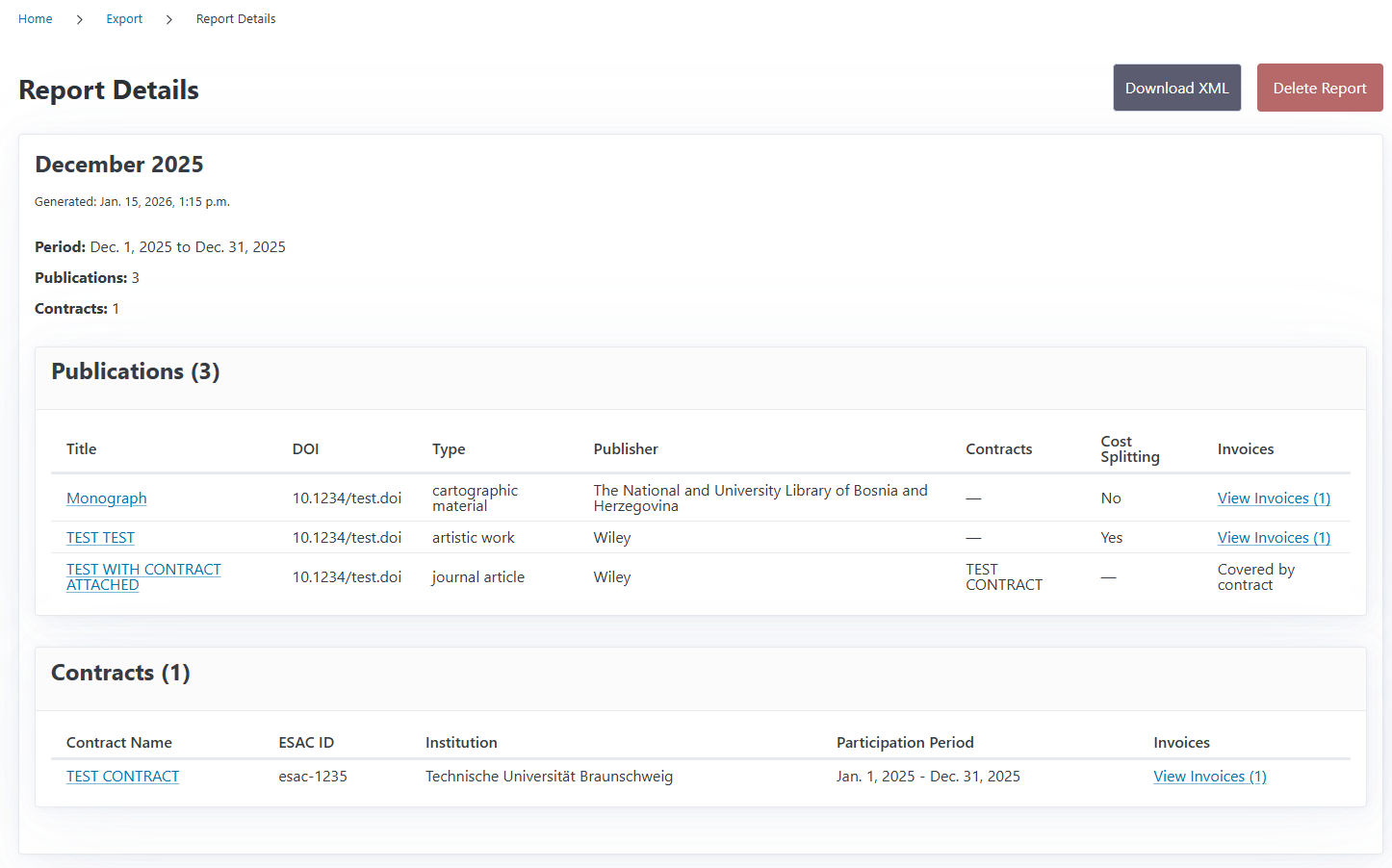
Clicking on a report from the overview page will show you detailed information including:
Complete publication list with titles, DOIs, and cost information
Contract information with associated publications
Individual invoices and their positions
Links back to the original CODA records (funding requests, contracts, invoices)
This detail view allows you to review the data before downloading the XML file and provides convenient navigation back to the source records if you need to make corrections.
Note
Each openCost report holds the XML document as it was at its last generation. If you update a publication or invoice afterwards, the stored report does not change by itself — use the Regenerate button above to refresh it, or keep the old report as a historical record.
Downloading the XML File#
To download an openCost XML report:
Navigate to the Export overview page or open a specific report’s detail page
Click the Download XML button
The XML file will be saved to your device with a filename that includes the report title, ID, and generation date
The downloaded XML file can be:
Shared with funding organizations or library consortia
Imported into cost analysis tools
Submitted to transparency initiatives
Used for internal reporting and analysis
Deleting Reports#
If you no longer need a report, you can delete it:
Locate the report on the overview page or open its detail page
Click the Delete Report button
Confirm the deletion when prompted
Warning
Deleting a report is permanent and cannot be undone. Make sure you’ve saved any XML files you need before deleting a report.
Cost Sharing and Multi-Institutional Publications#
CODA’s openCost export fully supports publications with cost sharing arrangements between multiple institutions. When a publication has costs split between several organizations, this information is automatically included in the openCost XML with the external_costsplitting field set appropriately. This information is set in the funding requests.
Contract and Invoice Grouping#
For publications linked to transformative agreements or other publishing contracts, CODA automatically includes:
Contract identifiers (ESAC Registry IDs)
Contract period information
Invoice groupings that link publications to their contracts
Individual invoice positions with detailed cost breakdowns
This comprehensive data structure helps track how publications relate to institutional agreements and enables better analysis of contract performance.
What’s Next?#
We’re continuously working to expand CODA’s exporting capabilities. Future releases intend to include:
Additional export formats (JSON)
Monitoring dashboards to visualize data
Custom report filters (by publisher, contract, funding source, etc.)